
Download our app – Cypress Crossings C4 – from the Apple Store, Google Play, ROKU Channel Store, or Amazon App Store to your smartphone or smart TV then setup your account.
Click the appropriate link below.
Apple Store
Google
ROKU
Amazon
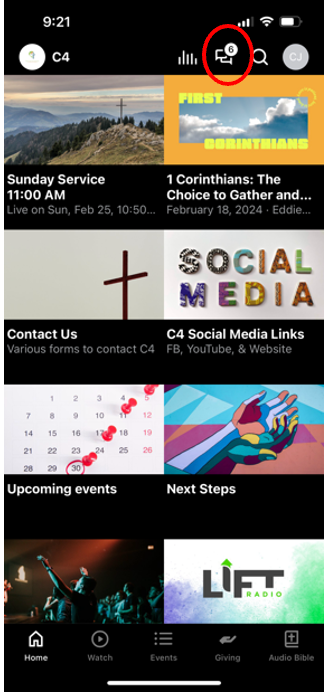
Once you have the C4 app installed and your account setup, open the app to see the main screen shown below. Click on the messaging icon in the top right of the screen (see red circle below).
Click the appropriate link below.
Apple Store
ROKU
Amazon
Once you have the C4 app installed and your account setup, open the app to see the main screen shown below. Click on the messaging icon in the top right of the screen (see red circle below).
Now you see the main messaging screen. If you have joined chat groups, they will appear here (see red circle below). A group with an unread message will be bold. Also, any conversations with specific individuals will appear in this list. To begin a conversation with someone, select the plus icon (not pictured) in the bottom right of this screen, enter the name(s) and message, and finally touch the airplane/jet symbol to send it. So simple!
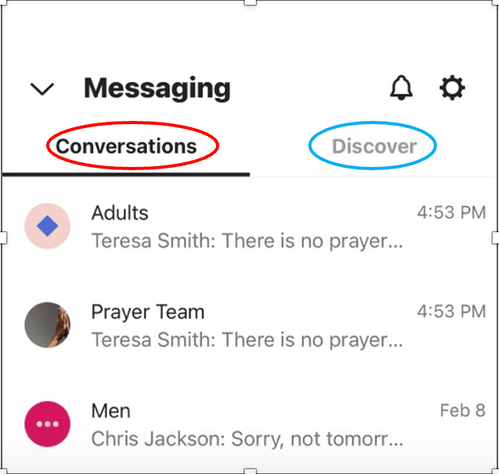
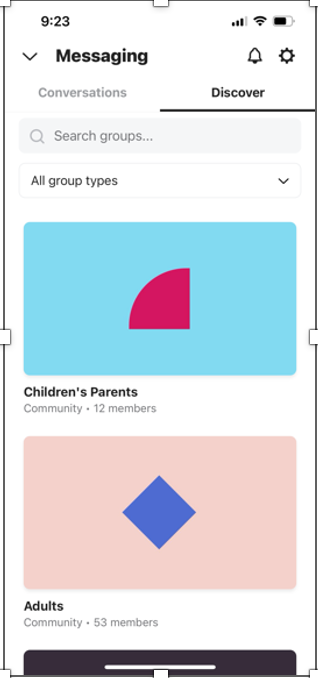
What did you say? You have not joined a chat group? Well, let’s get you connected. Touch Discover (see blue circle above) and the chat groups will appear. Select from the available options (examples shown below). To use one, go back to Conversations (see red circle above), touch the appropriate chat group, type your message, and touch the airplane/jet to send it.
A notification will appear on your phone when you receive a new message. To read it, open the C4 app, click on the messaging icon mentioned previously, and select the person or chat group that is bold.
Give it a try and you will be an expert in no time. While you are at it, explore the other features. I promise, you cannot break it.
Until next month, let’s stay connected and happy messaging!
Give it a try and you will be an expert in no time. While you are at it, explore the other features. I promise, you cannot break it.
Until next month, let’s stay connected and happy messaging!