Changing Your C4 Giving Data
1.Go to the C4 website – HTTPS://www.cypresscrossingscc.com.
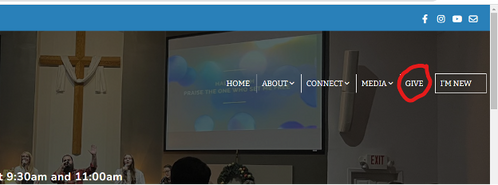
2.Click on Give in the menu (top right).
1.Go to the C4 website – HTTPS://www.cypresscrossingscc.com.
2.Click on Give in the menu (top right).
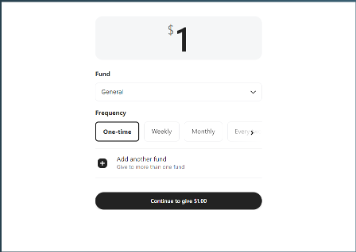
3.Scroll down until you see the section to enter your gift and enter $1 just to move forward (it will not be processed), select a fund and click on Continue to give $1.00.
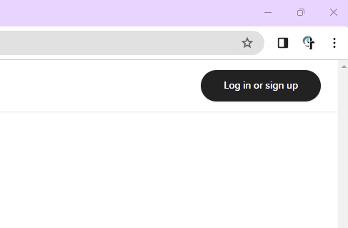
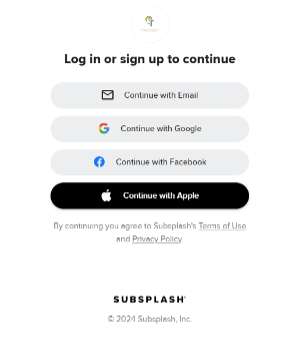
4.Click on Log in or sign up (top right).
5.Click Continue with Email.
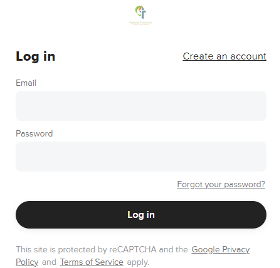
6.Enter your email address and password then click Log in.
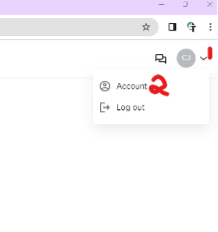
7.Once logged in, click on the button in the top right (number 1 in the picture below) and select Account.
8.From here you can update your profile, create a new gift, see your online giving history, and update your payment method(s). Since payment method was the specific question asked, I will explain it further. Click on Payment methods.
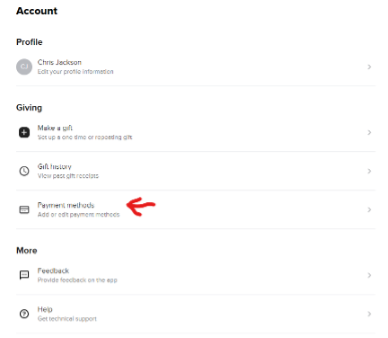
9.You will see your existing payment methods on the resulting screen plus an option for New payment method.
Now you are fully aware of how to update your online giving information, specifically the payment method.
a.Select the existing payment method to update the information like the expiration date. Once you enter the new information, then click on the Update button. There is also an option to delete the selected payment method (e.g., credit card is no longer valid).
b.Use New payment method to enter a new credit card as an example.
Now you are fully aware of how to update your online giving information, specifically the payment method.
Keeping Your Account Secure (provided by Subsplash, the owners of the technology used for our app and website)
In our commitment to excellence and innovation, your security is one of our top priorities at Subsplash. On a global level, cybersecurity challenges are constantly evolving and reports of high-profile compromises continue to increase.
We want to remind you about a quick and easy way to immediately improve your account security: updating your password. Consider taking a moment today to update the passwords for your Subsplash Dashboard account and the associated email account you use to log in. (Chris: Do it for your other online accounts too! When was the last time you changed your Amazon password?)
Cybercriminals frequently target weak passwords and take advantage of compromised accounts to gain access to other accounts where the same password is used. By regularly updating your passwords (especially for email accounts), you make it much more difficult for cybercriminals to break in.
Tips to create a strong password:
Making it easy
Password managers can be a great tool to help you create and store strong, unique passwords for all of your accounts. Many free options are available (such as those built into iCloud, Google Chrome, etc.). Dedicated password managers like 1Password and NordPass are also highly effective and reputable.
Our commitment to security
Our dedicated security team works diligently to protect your data and accounts. Updating your password further strengthens this defense. By taking this simple step today, you can significantly improve your account security and ensure that your information remains protected.
(Chris: Talk to you next month. I have some passwords to change!)
In our commitment to excellence and innovation, your security is one of our top priorities at Subsplash. On a global level, cybersecurity challenges are constantly evolving and reports of high-profile compromises continue to increase.
We want to remind you about a quick and easy way to immediately improve your account security: updating your password. Consider taking a moment today to update the passwords for your Subsplash Dashboard account and the associated email account you use to log in. (Chris: Do it for your other online accounts too! When was the last time you changed your Amazon password?)
Cybercriminals frequently target weak passwords and take advantage of compromised accounts to gain access to other accounts where the same password is used. By regularly updating your passwords (especially for email accounts), you make it much more difficult for cybercriminals to break in.
Tips to create a strong password:
• Uniqueness is key. Avoid using the same password for multiple accounts.
• Length matters. Aim for at least 12 characters, the longer the better.
• Mix it up. Combine uppercase and lowercase letters, numbers, and symbols.
• Avoid the obvious. Don’t use birthdays, pet names, and other information that’s easy to guess.
Making it easy
Password managers can be a great tool to help you create and store strong, unique passwords for all of your accounts. Many free options are available (such as those built into iCloud, Google Chrome, etc.). Dedicated password managers like 1Password and NordPass are also highly effective and reputable.
Our commitment to security
Our dedicated security team works diligently to protect your data and accounts. Updating your password further strengthens this defense. By taking this simple step today, you can significantly improve your account security and ensure that your information remains protected.
(Chris: Talk to you next month. I have some passwords to change!)
Download our app – Cypress Crossings C4 – from the Apple Store, Google Play, ROKU Channel Store, or Amazon App Store to your smartphone or smart TV then setup your account.
Click the appropriate link below.
Apple Store
Google
ROKU
Amazon
Click the appropriate link below.
Apple Store
ROKU
Amazon
The C4 app has so many useful features including messaging other users or joining chat groups, an online Bible, watching previous sermons, discipleship material, Christian music, event calendars and more. Download it and begin exploring. You cannot break it, I promise.